Earlier this year I sketched one page of everything I wanted connected in my business. People, properties, jobs, the pipeline, documents, phones, dashboards. It became MHP OS, the app my team runs on today.
This week I dropped a photo of that same page into Claude to see what it would do with it.
What came back
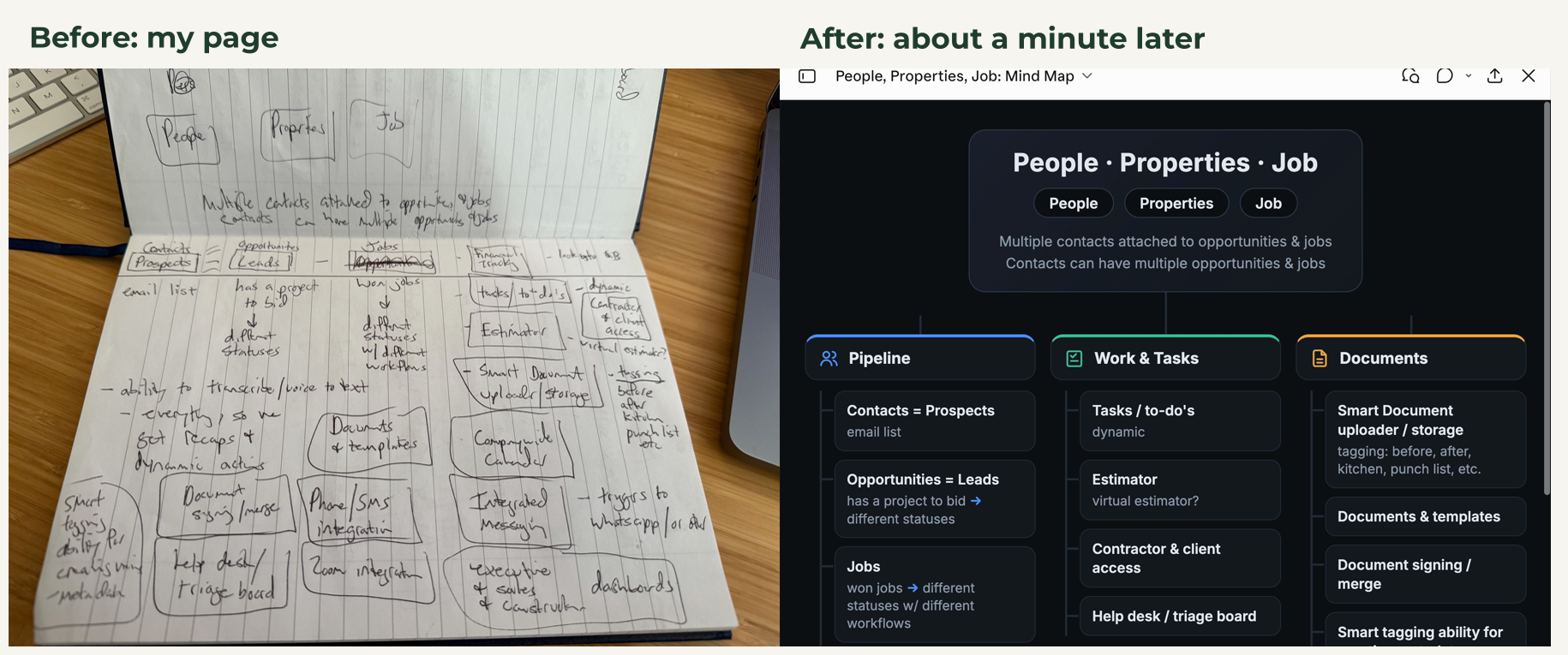
Left: the page I drew. Right: what came back, in my words.
It read my messy handwriting, kept my words, grouped them, and laid them out as one page. There were two margin notes it couldn't read. It left them out and asked me what they said, which is exactly what I told it to do.
We use the same idea at MaxHousePrice with our walk notes. This is habit 3, Messy in, clean out in action.
The setup (copy this)
This is the part that does the work. You write it once.
Paste this into your Project's instructions:
When I give you a photo of my handwritten notes or a mind map:
- Read every word and every branch. If you can't read something, ask me before you guess.
- Keep my words. Fix spelling only.
- Build ONE page as an artifact: an org-chart mind map. The main idea goes in a box at the top, the main groups branch below it, and my items hang under each group in my words. Dark, clean, fits a laptop screen.
- Make it look like a designer made it: plain words, simple icons, readable on a phone.
Do it today (5 minutes)
1. Give it a home. In Claude, go to Projects, then New project. Name it "Notes to page." Paste the setup into its instructions and save.
2. Take a clear photo. Flat page, good light, the whole page in the frame.
3. Drop it in and ask. Start a new chat in that Project, attach the photo, and type:
Paste this:
Make this a one page mind map.
That's it. From now on it's one photo and one ask.
Make it yours
A mind map is just what I wanted for this page. Change step 3 of the setup to whatever you need the page to be:
Paste this (pick one):
Build ONE page: a short summary at the top, my notes grouped under clear headings, and my action items as a checklist at the bottom.
Build ONE slide I can show my team: the main idea as the title and three to five short points.
Build ONE checklist I can follow, in the order I wrote things down.
Keep steps 1 and 2 as they are. Those are what keep it honest.
Common mistakes
Leaving out "ask me before you guess." Without it, it fills in words you never wrote, and the page looks right but isn't.
A blurry photo. If you can't read it on your phone, it can't either.
Asking for "a summary." A summary shortens your notes. You want your words organized, not cut.
Questions people ask
Can AI read my handwriting?
Do I need Claude for this?
Is it safe to upload my notes?
Any tool
The setup works the same anywhere. Only where you save it differs:
- Claude: a Project, with the setup in its instructions.
- ChatGPT: a Project, with the setup in its instructions.
- Gemini: a Gem, with the setup as its instructions.
- Any chat: paste the setup above your photo each time.
It's a marathon, not a sprint. One step today.